
What LightBurn does, what it costs, which version fits your machine, and how it compares to free options — a straight answer from Boss Laser.
Short answer
Yes — LightBurn is widely considered the best all-around laser software for most users. It combines design layout, photo and image engraving, and machine control in one app, and it supports most machine types: Ruida and other DSP CO2 lasers, GCode/diode engravers, and EZCad galvo fiber and UV markers. It is paid, not free — about $99 (Core, for GCode machines) to $199 (Pro, for DSP and galvo) — with a perpetual license and optional paid yearly updates. Free alternatives like LaserGRBL work but are limited to GRBL/diode machines and lack LightBurn’s photo and layout tools. For most engravers, LightBurn is worth the cost.
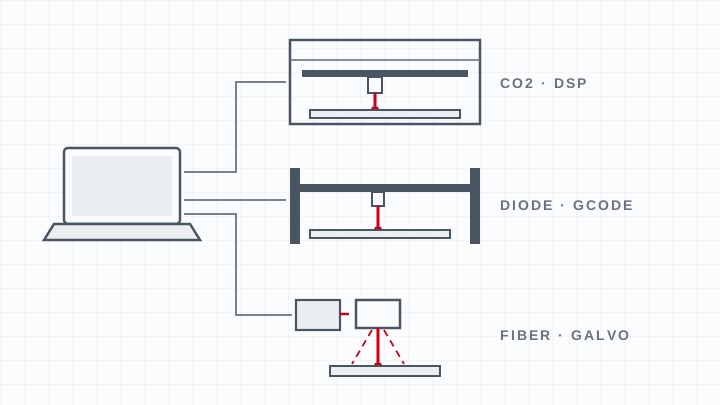
Why LightBurn is the go-to laser software.
LightBurn earns its reputation by doing the whole job in one place. You can lay out and edit artwork, import vectors and images, prepare photos for engraving, and send the job to the machine without bouncing between programs. It handles raster engraving with proper photo dithering and grayscale, vector cutting, camera alignment, and material test grids, and it is actively developed with frequent updates.
It also supports the widest range of hardware: the Ruida and other DSP controllers used in professional CO2 lasers, GCode/GRBL diode engravers, and EZCad galvo fiber and UV markers. That breadth is a big reason it has become the default for serious hobbyists and shops alike.
What LightBurn costs and which version you need.
- Core (~$99) drives GCode machines — most diode/GRBL engravers.
- Pro (~$199) adds DSP and galvo support — the tier for Ruida-controller CO2 lasers and EZCad fiber/UV markers.
- Perpetual license. You keep the version you bought; a low yearly fee (around $40) only adds future updates and is optional.
- Free trial lets you test it with your machine before buying.
Boss fiber markers also ship with EZCAD, which many operators use for galvo marking; LightBurn is the choice when you want one consistent workflow across CO2 and fiber.
LightBurn vs. free software.
The main free option, LaserGRBL, is a solid starting point but only controls GRBL-based diode machines, runs on Windows only, and lacks LightBurn’s layout and photo tools. Inkscape is a free design program some people pair with G-code plugins. If you run a CO2 or fiber machine, or you engrave photos and complex layouts, LightBurn’s capabilities quickly justify the price.
Related questions
Is LightBurn the best software for laser engraving?
For most users, yes. LightBurn combines design, photo engraving, and machine control in one app and supports nearly every machine type, which is why it is the most recommended laser software. The main reason to use something else is budget (a free GRBL tool) or a galvo workflow already built around EZCAD.
Is LightBurn free? What is the best free laser engraving software?
No, LightBurn is paid — about $99 to $199 depending on machine type, with a free trial. The best free options are LaserGRBL (for GRBL/diode engravers, Windows only) and Inkscape for design, but both lack LightBurn’s photo and layout tools.
What software should you use for laser engraving?
LightBurn is the best all-around choice for diode, CO2, and fiber machines. Fiber/galvo markers can also run the included EZCAD software, and budget diode users can start with free LaserGRBL. Pick based on your machine type and whether you need photo and layout features.
How do you laser engrave a photo in LightBurn?
Import the image, set it to grayscale or a dither mode (Jarvis or Stucki work well for photos), then set DPI, power, and speed for your material. Run a small test on scrap to confirm contrast, then frame and engrave. Cast materials and good focus make the biggest difference in photo quality.
How do you use LightBurn for laser engraving?
Select your machine/controller in LightBurn, import or design your artwork, and assign layers — raster for engraving, vector for cutting. Set power, speed, and DPI per layer, frame the job on the bed, then send it to the laser. Save settings as a library for repeat jobs.
Can you run laser engraving software on Windows 10?
Yes. LightBurn runs on Windows 10 and 11, as well as macOS and Linux. LaserGRBL is Windows-only, so if you use a Mac, LightBurn is the better fit.
Can you control laser speed and power live in LightBurn?
Yes. You set speed and power per layer before running, and many DSP controllers let you adjust speed or power overrides at the machine during a job. LightBurn also has a framing and pause workflow so you can check placement before committing.
Keep going
- Learn: Cutting vs. Engraving
- Related: How do you use a laser engraver? · What is laser engraving?
- Products: LS / HP CO2 lasers · FM Series fiber markers