
Which laser to use, what wattage you need, and how etching, engraving, and annealing actually differ — a practical guide from Boss Laser.
Short answer
For permanent marks straight onto bare metal, use a fiber laser marker — its 1064 nm beam is absorbed by metals like stainless steel, aluminum, brass, titanium, and copper. A CO2 laser can only mark bare metal with a marking spray (such as CerMark or LaserBond); a UV laser is used for fine, low-heat marks on sensitive parts. Small diode and hobby lasers can mark some coated or anodized metals but cannot truly engrave raw metal. Match the laser type to the metal first, then dial in power, speed, and focus.
Match the laser to the metal first.
How you engrave metal depends almost entirely on which laser you have. The three laser types behave very differently on metal:
Fiber lasers (≈1064 nm) are the right tool for direct metal work. Metal absorbs this wavelength efficiently, so a fiber marker can anneal, etch, or engrave stainless steel, aluminum, brass, copper, titanium, and most other metals with no coating and no contact. Fiber is fast, repeatable, and the marks are permanent — which is why it is the standard for serial numbers, barcodes, logos, tools, and industrial parts. Boss Laser’s FM Series fiber markers cover this range, from the compact FM Desktop (20, 30, and 50 watts) to the FM Station (20, 30, 50, and 100 watts) for heavier production.
CO2 lasers (≈10,600 nm) are excellent on wood, acrylic, leather, and glass, but their wavelength is reflected by bare metal. To mark metal with a CO2 laser you apply a marking spray or paste (CerMark, LaserBond, or similar): the laser bonds the coating to the surface, and you wash off the excess to leave a durable dark mark. This is a real, production-proven method — it just adds a consumable and a couple of steps, and it bonds a mark to the surface rather than cutting into the metal.
UV lasers (≈355 nm) do “cold” marking through a photochemical reaction with very little heat. The heat-affected zone is tiny, so UV is used for high-precision, low-stress marks on sensitive metal parts in electronics and medical work.
Understand etching vs. engraving vs. annealing.
These words get used interchangeably, but on metal they describe three different results:
- Annealing uses controlled heat to change the metal’s surface color — usually a black or dark gray mark — without removing any material. The surface stays smooth. It is the go-to for stainless steel and titanium where you need a clean, corrosion-safe mark.
- Etching melts a very thin top layer, creating a mark you can feel with a fingernail. It is fast and high-contrast, good for logos and 2D codes.
- Engraving removes material to cut an actual recess into the metal. It is deeper, more wear-resistant, and slower — used when the mark has to survive heavy handling or refinishing.
Dial in power, speed, and focus.
Once the laser type matches the metal, results come down to settings:
- Set focus accurately. Metal marking is unforgiving of a bad focal point. Use the machine’s focus gauge or autofocus before every job.
- Choose the mark type for the job. Anneal for clean color marks, etch for fast contrast, engrave for depth.
- Balance power and speed. Higher power and slower speed put more energy into the surface (deeper, darker); lower power and faster speed give lighter, finer marks. Run a small test grid on scrap of the same alloy before committing to the part.
- Add passes for depth. Deep engraving builds up over multiple passes rather than one high-power hit.
- Protect the work and yourself. Use proper ventilation and laser-safe eyewear, and keep the metal flat and secured so the focal distance stays constant.
What wattage do you need to engrave metal?
For marking and etching most metals, a 20–50 watt fiber marker is the practical sweet spot and handles the vast majority of jobs. For deep engraving or faster throughput on harder alloys, step up toward 50–100 watts. Wattage is only part of the picture — beam quality, focus, and the metal itself matter just as much — but as a rule of thumb, a hobby-class diode in the single-digit-to-low-double-digit watts is for marking coated or anodized surfaces, while genuine bare-metal engraving starts with a fiber laser.
Metal engraving FAQs
Exact answers to the most-searched variants of this question.
Can a CO2 laser engrave anodized aluminum?
Yes. Anodized aluminum is one of the few metals a CO2 laser marks well without any spray. The laser bleaches the colour out of the dyed anodic coating without removing it, leaving a crisp white-frost-on-dark mark with the corrosion protection intact. For bare (non-anodized) aluminum, you would need a marking spray or a fiber laser. More on engraving anodized aluminum →
What watt / wattage laser do you need to engrave metal?
For marking and etching, a 20–50 watt fiber laser covers most metals. For deep engraving or higher production speed, move to 50–100 watts. Diode lasers under ~10 watts are for marking coated or anodized surfaces, not for engraving bare metal.
Can a 10W laser engrave metal? Can a 5W laser engrave metal?
Not bare metal in the true sense. A 5W or 10W diode laser can mark some metals if they are coated with a marking spray, anodized, or painted — the laser reacts with the coating rather than the metal itself. To engrave or anneal raw stainless, aluminum, or brass, you need a fiber laser.
Can you engrave stainless steel with a diode laser?
You can get a mark on stainless with a diode laser, but the dependable method is a stainless marking spray or paste. On bare stainless a diode usually leaves only a faint, low-contrast surface mark and cannot anneal the steel the way a fiber laser does. For fast, consistent, dark, production-grade marks on stainless, a fiber laser is the right tool.
Can you engrave brass with a diode laser?
Brass is reflective and tough for low-power diodes. A diode laser can mark brass that has been coated with marking spray, but it cannot engrave raw brass cleanly. A fiber laser marks and engraves brass directly.
How do you laser etch metal?
Laser etching melts a thin top layer of the metal to create a raised, high-contrast mark. Use a fiber laser (or a CO2 laser with marking spray), set the focus, then run higher power at moderate speed so the surface melts without cutting a deep cavity. Test on scrap of the same alloy first.
What is laser etching on metal?
Laser etching is a marking method that uses a focused beam to melt a shallow top layer of the metal, producing a permanent, slightly raised mark. It sits between annealing (color change, no material moved) and engraving (material removed to form a recess), and it is valued for speed and contrast on logos, codes, and ID plates.
How do you remove laser engraving or laser etching from metal?
It depends on depth. Shallow surface annealing or etching marks can often be reduced or removed by sanding, grinding, or polishing the surface back, then refinishing to match. True engraving cuts a recess into the metal, so it usually cannot be fully removed without machining away material and refinishing — which is exactly why engraving is chosen when a mark must be permanent and tamper-resistant.
Keep going
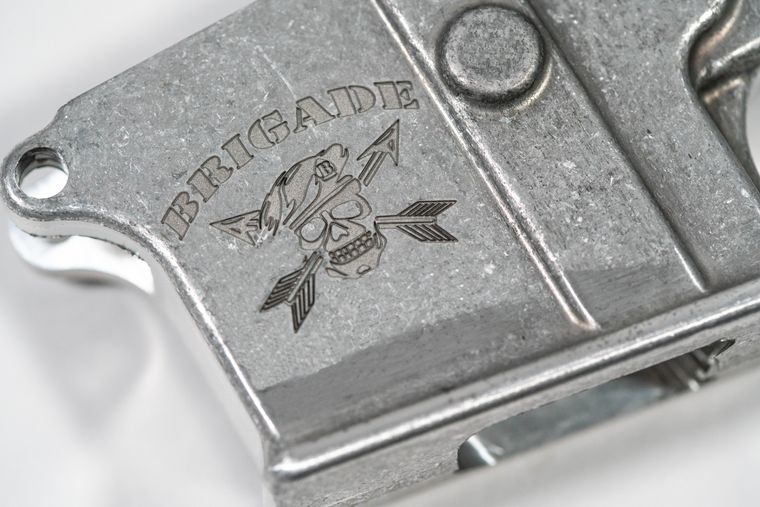 Learn article
Laser Etching
Etching melts a shallow top layer rather than cutting a recess — faster than engraving, more durable than marking.
Read the article →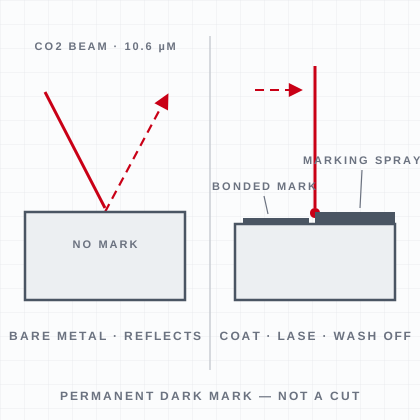 FAQ
FAQCan a CO2 laser engrave metal?
A CO2 laser can't mark bare metal directly – it needs a marking spray like CerMark, which bonds a permanent dark mark.
See the answer → FAQ
FAQAnodized aluminum
Yes – anodized aluminum is one of the few metals a CO2 laser marks directly, no spray needed.
See the answer →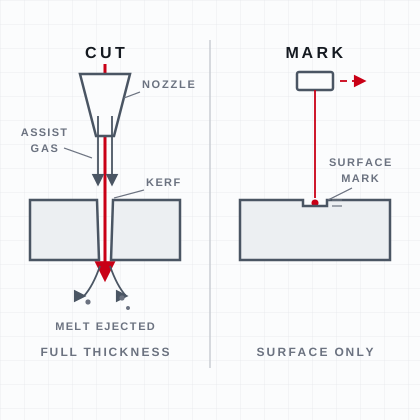 FAQ
FAQCan a laser cutter cut metal?
Yes, but you need a fiber laser.
See the answer →FAQWhat is a fiber laser engraver?
A fiber laser engraver creates a 1064nm beam in an optical fiber to permanently mark and engrave metal (and many plastics).
See the answer →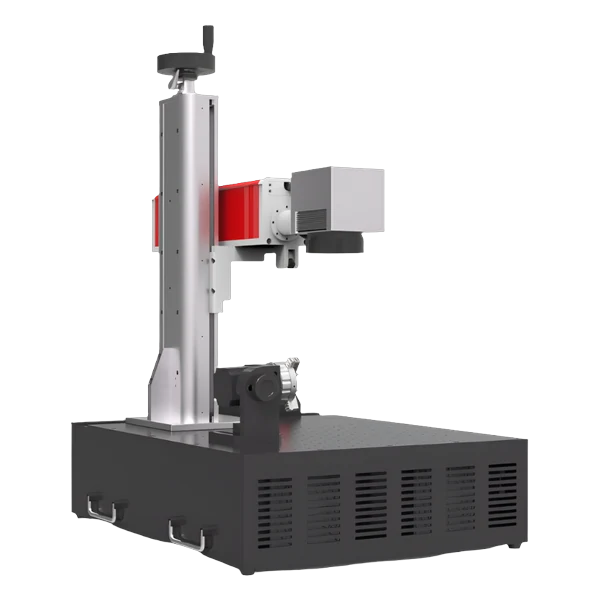 Machines
FM Series fiber markers
A fiber marker changes the metal itself — no coating, no spray, nothing to wipe off.
See the machines →