
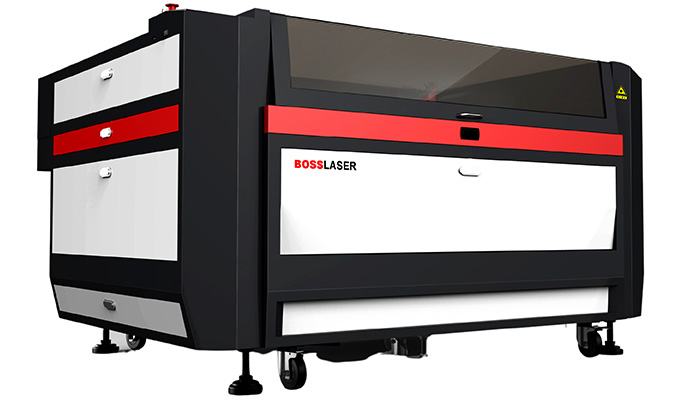
Boss CO₂ (LS / HP series)
CO₂ cutting & engraving
Beginner → operator
Fiber metal-cutting assist gas
On a CO₂ laser, air assist is a stream of air pushed through the nozzle around the beam. It does three jobs: it ejects smoke and debris out of the cut so the beam is not scattered by its own plume, it suppresses flame and charring at the edge, and it keeps vapor and spatter off the lens so optics last and cuts stay consistent. CO₂ air assist is low pressure — enough steady, clean flow to clear smoke and hold down flame, not a blast. The failure that quietly costs the most money is moisture and oil in the air line reaching the lens; put a separator on the supply. (This is not the same as fiber metal cutting, where high-pressure O₂/N₂ actually does the cutting — see the fiber guide.)
1 · What air assist actually does
Air assist is not a nice-to-have accessory bolted onto the cut — it is part of how a clean CO₂ cut happens. Three jobs, all at once:
| The job | What happens without it |
|---|---|
| Clear the cut path — blow smoke, vapor and molten debris out of the kerf | The plume sits in the beam and scatters or absorbs it, so the beam reaching the material is weaker and less focused. Cuts get ragged, slow, or fail to go through. |
| Suppress flame & charring — starve and cool sustained flame at the edge | Flammable materials (wood, acrylic, paper) flare; edges char, discolor, and pick up soot. Worst case: a sustained fire. |
| Protect the lens — keep rising vapor and spatter off the optic | Smoke coats the lens, which then absorbs the beam, overheats, and can crack. A fouled lens also drifts your settings — the same job slowly needs more power. |
The one-line mental model
Air assist keeps the beam clean going down and the debris moving out. Everything else — edge quality, lens life, fire safety — follows from those two.
2 · How much air — and when more actually hurts
CO₂ air assist is a low-pressure job, and it is one of the few settings where turning it up can make the cut worse. More air is not more better:
- Too much air on acrylic feeds oxygen to the cut and fans flame, and it can frost or matte the flame-polished edge that makes acrylic worth cutting on CO₂.
- Too much air can chill or roughen the cut on some materials, trading a clean melt for a rougher edge.
- Too much pressure can force smoke under masking or lift light material off the bed.
- Too little air is the more common and more expensive mistake — that is charring, fire risk, and a fouling lens.
The target is enough steady, clean flow to clear the smoke and keep flame down — then stop. Tune it per material while watching the cut, not by a single number you set once. As a rule it is low pressure — a few psi from a diaphragm pump for engraving and light work, up into the tens of psi on regulated compressed air for cutting — but the exact ranges are machine- and material-specific, so dial in against your own machine rather than a fixed figure.
The acrylic exception
For the glossiest flame-polished acrylic edge, some shops deliberately run minimal air. It can produce a beautiful edge — but it raises fire risk and demands you stay right at the machine. Decide by the part: a safe, clean, low-char cut wants good air; a show-polished display edge is the one case to back the air down, under close watch.
3 · The equipment behind the air
“Air assist” is really a small air system: a source, clean-up, regulation, and the nozzle. Each part has a way of quietly going wrong.
| Part | What to use | Why it matters |
|---|---|---|
| Air source | Built-in diaphragm pump, or a shop air compressor | A diaphragm pump gives low-pressure flow that suits most CO₂ work. A compressor gives more pressure and volume for heavier cutting but must be cleaned up (next row). |
| Water & oil separation | Coalescing filter / water–oil separator (and a dryer for humid shops) | The silent lens-killer. Compressed air carries water and compressor oil; on the lens it fouls the optic, on the cut it causes spitting and marks. Not optional with a compressor. |
| Regulator | Adjustable, with a gauge you can read | Lets you set low pressure per material instead of blasting everything at line pressure. |
| Nozzle | Correct nozzle for the lens/cone, clean, aligned, right standoff | A dinged, sooty, or off-center nozzle wrecks the air cone and the cut. Keep it clean and concentric to the beam. |
The water/oil problem is the #1 avoidable lens death
If you cut with a shop compressor and no separator, you are spraying a fine mist of water and oil straight at your focusing lens. The lens fouls, absorbs the beam, overheats, and cracks — and you will blame the lens. Put a water & oil separator inline, drain it, and check the air is dry before a long job. This single habit saves more optics than any other.
4 · Air assist by material
Different CO₂ materials want different amounts of air. Starting points, not gospel — dial in while watching the cut.
| Material | Air assist approach | Watch for |
|---|---|---|
| Acrylic (cut) | Moderate, steady — enough to hold flame down and keep the cut clean. Back off for a flame-polished show edge (under watch). | Too much frosts the edge and fans flame; too little chars and risks fire. |
| Wood / MDF / plywood | Stronger air — wood smokes and chars, and good flow clears the plume and keeps edges lighter. | Sooty, dark edges = not enough air or exhaust. Resin flare-ups on some plywood. |
| Leather | Good steady air to clear smoke and reduce charring and smell. | Charred, stiff edges; heavy odor if the plume lingers. |
| Paper / card / thin stock | Gentle — enough to clear smoke without lifting or rippling the sheet. | Light stock blowing around; scorching if flow stalls. |
| Engraving (most materials) | Light, consistent flow to keep debris and smoke off the fresh surface and off the lens. | Hazy or redeposited residue on the engrave; a fouling lens on long raster jobs. |
Exhaust is air assist’s partner, not a substitute
Air assist pushes the plume out of the cut; the exhaust/extraction pulls it out of the machine. You need both. Weak exhaust re-deposits everything air assist just cleared.
5 · Troubleshooting
| Symptom | Likely cause | Fix |
|---|---|---|
| Charred, sooty, dark cut edges | Too little air assist and/or weak exhaust — plume sitting in the cut | Increase steady air flow; confirm exhaust is pulling; clean the nozzle so the cone is even. |
| Sustained flame at the cut | Insufficient air on a flammable material, or too-slow feed dumping heat | Raise air to hold flame down, speed up / lower power; never leave the machine. |
| Lens fouling fast / cracking | Cutting with too little air (smoke coats lens) OR water/oil in the air line | Fix air coverage; add and drain a water/oil separator; clean and inspect the lens. |
| Spitting, droplets or marks on the cut | Water/oil carried from the compressor onto the work | Separator + dryer inline; drain the tank; verify dry air before a long run. |
| Acrylic edge frosted/matte instead of glossy | Too much air on acrylic | Reduce air for that job (accept higher fire risk, watch closely). |
| Smoke etching the surface near cut lines | Air forcing plume under masking, or weak extraction | Reduce excess pressure, use wrinkle-free masking, strengthen exhaust. |
| Uneven cut across the bed / one side worse | Nozzle off-center to the beam, or damaged/clogged nozzle | Re-center and clean the nozzle; replace if dinged; check standoff height. |
| Same job slowly needs more power | Optics drifting from smoke exposure | Clean optics; treat rising power demand as an early warning, not normal wear. |
6 · Maintenance & safety habits
- Drain the separator and tank on a schedule — trapped water/oil only helps while it is actually trapped.
- Check flow before each job — a pinched line, clogged nozzle, or failed pump gives you no protection, and you will not notice until the edge chars.
- Keep the nozzle clean, aligned, and at the right standoff — the air cone has to be concentric with the beam.
- Never run cutting unattended, keep an extinguisher in reach, and run the exhaust every time. Air assist reduces flame; it does not remove the need to watch.
7 · Cutting metal? Read this first
CO₂ vs. fiber for metal — and where the Boss HP series fits
Everything above is about low-pressure air assist, which helps a CO₂ cut but does not do the cutting. Metal cutting is a different process. A fiber laser cuts metal with high-pressure assist gas (oxygen or nitrogen) that physically ejects the molten metal from the kerf — the gas is part of the cutting mechanism, not just cleanup, and it sets the edge chemistry.
The honest split: for the vast majority of metal work — up to about an inch — fiber is the more efficient, practical tool, and that is what most businesses run. For very thick steel over ~1 inch, high-power CO₂ can cut better, and Boss’s HP series is that high-power CO₂ platform. For the full picture — how much power you need, oxygen vs. nitrogen, and edge quality — go to the Fiber Laser Power Guide →
Frequently asked
CO₂ air assistQDo you need air assist on a CO₂ laser?
For cutting and most engraving, yes. It clears smoke and debris from the beam path, suppresses flame and charring, and protects the lens from vapor and spatter. Running without it risks fires, scorched edges, and a fouled lens. The main exception: some operators reduce air for a flame-polished acrylic edge, accepting the higher fire risk under close watch.
QWhat does air assist actually do?
It sends air through the nozzle around the beam to (1) eject smoke and molten debris from the cut so the beam is not scattered by its own plume, (2) suppress flame and reduce charring at the edge, and (3) keep vapor and spatter off the focusing lens.
QHow much air assist pressure should I use?
CO₂ air assist is low pressure. Run enough steady, clean flow to clear smoke and hold flame down, then stop — more can fan flame on acrylic, roughen the cut, or force smoke under masking. Tune per material while watching the cut.
QWhy does my lens keep getting dirty or cracking?
Usually either cutting with too little air (smoke coats the lens) or water and compressor oil carried in the air line. A contaminated lens absorbs the beam, overheats, and can crack. Fix air coverage and add a water/oil separator to the supply.
QCan I use my shop air compressor for air assist?
Yes, if the air is clean and dry. A compressor gives more pressure than a small diaphragm pump but also carries water and oil that will ruin a lens. Regulate it down for the material and run it through a water/oil separator or coalescing filter first.
QIs CO₂ air assist the same as fiber assist gas?
No. CO₂ air assist is low-pressure cleanup and flame control. Fiber metal cutting uses high-pressure oxygen or nitrogen that physically ejects molten metal and sets the edge — the gas is part of the cut. See the Fiber Laser Power Guide.
Related guides & next steps
- How Laser Cutting Works — the three mechanisms underneath the settings, and where assist gas fits into each, in the Learn library.
Ready to cut on a Boss CO₂?
Get the machine that suits your material and shop.
Air assist is one setting on a well-built machine. Browse the Boss CO₂ lineup, or tell a specialist what you cut and we will point you to the right system.