
On this page
Jump to your question
The Basics
What is laser engraving?
Short answer
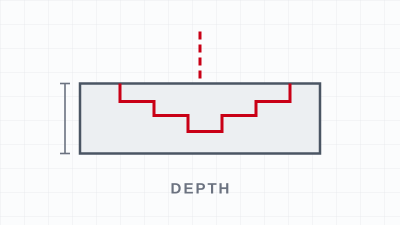
Laser engraving is a marking process that uses a focused laser beam to remove or alter the surface of a material, leaving a permanent mark with no ink, tools, or contact. The beam’s heat vaporizes or changes a thin top layer, so the design becomes part of the material itself — it won’t rub off or fade like print. It works on wood, acrylic, leather, glass, and, with the right laser, metal and plastic. Strictly, engraving removes material to form a recess; etching, marking, and annealing describe shallower or color-change versions of the same idea. The result is fast, repeatable, and highly detailed.
How laser engraving works
A laser engraver focuses a beam to a fine point and moves it across the material under computer control. The concentrated heat vaporizes or alters a thin surface layer where the design specifies. For images and text the beam rasters, building the mark line by line. Because the mark is in the material rather than printed on top, it is permanent.
Engraving vs. etching, marking, and cutting
- Engraving removes material to cut a recess you can feel.
- Etching melts/fractures a thin top layer for a shallow high-contrast mark (e.g., frosted glass).
- Marking/annealing changes surface color without removing material (common on metal with fiber).
- Cutting drives the beam all the way through to separate the part.
What laser engraving is used for
Personalized gifts and drinkware, signage, awards and plaques, prototyping, and (with a fiber laser) industrial part numbers, barcodes, and traceability marks.
More ways this gets asked
What is laser engraving?
Laser engraving uses a focused laser beam to remove or alter the surface of a material, leaving a permanent mark without ink or contact. The heat vaporizes or changes a thin layer, so the design is part of the material and won’t rub off. It works on wood, acrylic, leather, glass, and — with the right laser — metal and plastic.
How does laser engraving work?
A focused beam is moved across the material under computer control, and its concentrated heat vaporizes or alters a thin surface layer to form the mark. For images and text the beam rasters back and forth, building the design line by line. The result is permanent because it is burned or cut into the surface, not printed on it.
What is laser engraving used for?
It is used for personalized gifts, drinkware, signage, awards, and prototyping, and for industrial part numbers, barcodes, and traceability marks. Anywhere a permanent, detailed, no-ink mark is needed, laser engraving fits — from one-off custom pieces to high-volume production.
What is a laser engraving machine?
It is a device that focuses a laser beam and moves it across a material under software control to mark or cut it. Machines are grouped by laser source: CO2 for wood, acrylic, leather, and glass; fiber for metal and plastic; UV for fine, low-heat marks; and small diode units for light hobby work.
What is laser engraving / marking paper?
Laser marking paper is a coated consumable sheet used to mark materials a bare beam struggles with — you place it on metal or glass, run a CO2 laser over it, and the coating bonds a permanent dark mark to the surface. It works like marking spray in sheet form and is removed after the mark is made.
How does laser engraving work on wood?
On wood the beam’s heat chars and vaporizes the surface, leaving a darkened, slightly recessed mark. Softer woods and tight grain engrave more evenly, while hard or resinous woods and wide grain give more contrast variation. Wood is one of the most forgiving and popular materials to engrave.
Related: What is a laser cutter? · How does a laser cutter work? · How do you use a laser engraver?
The Process
How do you use a laser engraver?
Short answer
Using a laser engraver follows the same loop on every job: create or import a design in laser software (such as LightBurn), set each part to engrave (raster) or cut (vector), pick power and speed for your material, set focus, run a quick test on scrap, then run the job with air assist and exhaust on and the lid closed. Match settings to the material — wood, acrylic, leather, and glass behave very differently — and start low on power and high on speed, adjusting one setting at a time. The machine is the easy part; dialed-in settings and a good test habit are what produce clean results. Never run unknown plastics, and never leave the laser unattended.
Set up your design and software
Every job starts in laser software like LightBurn. Create or import artwork, then set each part to raster engraving (sweeps to burn an image/text) or vector cutting (follows a line to cut through). Lay parts out, use separate engrave and cut layers, and engrave before cutting.
Set material, focus, and run a test
- Choose material settings (power, speed, DPI) from a tested library; start low power, high speed when unsure.
- Place the material and set focus with the gauge or autofocus.
- Frame the job to confirm placement.
- Test on scrap of the same material.
- Turn on air assist and exhaust, close the lid, and run, staying with the machine.
- Inspect, adjust one variable, and save the recipe.
Match the settings to the material
Wood and leather char to brown; acrylic engraves bright and cuts glossy; glass frosts at low power; coated/anodized metals mark on CO2 while bare metal needs a fiber marker. Never run PVC or vinyl (hydrogen chloride, then hydrochloric acid), and identify unknown plastics first.
More ways this gets asked
How do you use a laser engraver machine?
Design or import artwork in laser software, set each part to engrave or cut, choose power and speed for the material, set focus, and run a test on scrap. Then turn on air assist and exhaust, close the lid, and run the job while staying with the machine.
How do you use laser engraver software?
In software like LightBurn you import or draw your design and assign layers: raster layers for engraving images and text, vector layers for cutting. You set power, speed, and DPI per layer, arrange the layout on the bed, and frame the job before sending it to the laser.
How do you laser engrave for the first time (beginner)?
Follow the loop: make a simple design, set it to engrave, choose conservative settings (low power, high speed), set focus, and test on scrap. Adjust one setting at a time until the mark looks right, then save those settings as your starting recipe for that material.
Can you use a laser engraver with Fusion 360, a CNC workflow, or design software?
You can design in many tools — Fusion 360, Illustrator, Inkscape, and others — and export vector or image files into your laser software. A laser engraver is its own machine, not a CNC router or printer, but the workflow of design, settings, focus, test, and run is the same.
Related: How do you use a laser cutter? · Is LightBurn good software? · What is the best laser engraver?
Materials
How do you laser engrave glass?
Short answer
To engrave glass, use a CO2 laser. Its 10.6 µm beam is absorbed at the glass surface and micro-fractures a thin top layer into a bright frosted-white mark — ideal for logos, text, and dithered photos on bottles, glasses, awards, and panels. Fiber and most diode lasers are the wrong tool for clear glass: a fiber laser’s 1064 nm beam passes straight through it, and diodes only mark glass that has been coated or painted first. The deep photos that appear to float inside a solid crystal block are a different process — sub-surface laser engraving with a green or UV laser, not surface CO2 work. For surface engraving, run low power and higher speed, and cover the area with damp paper to reduce chipping.
Use a CO2 laser to engrave glass
Glass engraving is a surface process. A CO2 laser’s 10.6 micron wavelength is absorbed by the glass, and the heat micro-fractures a shallow top layer into a frosted, opaque-white mark. You are not cutting into the glass, and you should not cut through it, because glass is brittle and thermal shock cracks it. Boss LS and HP series CO2 systems are the right machines. Fiber (1064 nm) passes through clear glass and diodes only mark coated glass.
Dial in settings and reduce chipping
- Start low power, high speed, high DPI for a fine even frost.
- Cover the area with damp paper to dissipate heat and reduce chipping.
- Use a rotary attachment for round items so focus stays constant.
- Run a test on a similar piece first.
- Clean and optionally add contrast for photos.
Engraving photos vs. 3D crystal blocks
Photos on flat glass or glassware are a CO2 surface job (grayscale + dither + frost). The floating 3D photo inside a solid crystal block is sub-surface laser engraving with a green or UV laser focused inside the material, which is specialized equipment a surface CO2 laser cannot replicate.
More ways this gets asked
How do you laser engrave glass blocks with photos?
There are two kinds. A flat glass photo is done on a CO2 laser by converting the image to grayscale, dithering it, and frosting it onto the surface. The 3D photo that floats inside a solid crystal block is a different process called sub-surface laser engraving, which uses a green or UV laser focused inside the glass — a surface CO2 laser cannot create that internal effect.
How do you laser engrave glass / how do you engrave glass with a laser?
Use a CO2 laser at low power and high speed to frost the surface. Cover the area with damp paper to reduce chipping, use a rotary attachment for round items, and run a quick test on a similar piece before the real part.
Can you laser engrave glass?
Yes. Glass engraves well on a CO2 laser, which frosts a thin surface layer into a bright white mark for logos, text, and photos. It is a surface mark, not a cut.
Can a CO2 laser engrave glass?
Yes — a CO2 laser is the right tool for glass. Its 10.6 µm wavelength is absorbed at the surface and frosts it cleanly. Keep power low and speed high for a smooth, chip-free result.
Can a diode laser engrave glass?
Only if the glass is coated or painted first. A bare-glass surface does not absorb a diode’s wavelength well, so the diode marks the coating rather than the glass. For direct marks on bare glass, use a CO2 laser.
Can a fiber or MOPA laser engrave glass?
No, not clear glass. A fiber laser (MOPA is a type of fiber laser) emits around 1064 nm, which passes straight through clear glass without leaving a mark. Fiber is for metals and many plastics; use CO2 for glass.
Can a laser engraver cut glass?
No. Lasers do not cleanly cut glass — the thermal stress cracks it. A CO2 laser engraves the surface only; cutting glass to size is still done mechanically (score-and-snap or a wet saw).
Can a laser engraver etch glass?
Yes. On glass, “etching” and “engraving” describe the same frosted surface mark a CO2 laser produces. Lighter, faster settings give a shallower etch; the technique is identical.
Related: Can a laser cutter cut glass? · What can a fiber laser engrave? · Glass, stone & ceramic applications
Materials
How do you laser engrave metal?
Short answer
For permanent marks straight onto bare metal, use a fiber laser marker — its 1064 nm beam is absorbed by metals like stainless steel, aluminum, brass, titanium, and copper. A CO2 laser can only mark bare metal with a marking spray (such as CerMark or LaserBond); a UV laser is used for fine, low-heat marks on sensitive parts. Small diode and hobby lasers can mark some coated or anodized metals but cannot truly engrave raw metal. Match the laser type to the metal first, then dial in power, speed, and focus.
Match the laser to the metal first
How you engrave metal depends almost entirely on which laser you have. The three laser types behave very differently on metal:
Fiber lasers (≈1064 nm) are the right tool for direct metal work. Metal absorbs this wavelength efficiently, so a fiber marker can anneal, etch, or engrave stainless steel, aluminum, brass, copper, titanium, and most other metals with no coating and no contact. Fiber is fast, repeatable, and the marks are permanent — which is why it is the standard for serial numbers, barcodes, logos, tools, and industrial parts. Boss Laser’s FM Series fiber markers cover this range, from the compact FM Desktop (20, 30, and 50 watts) to the FM Station (20, 30, 50, and 100 watts) for heavier production.
CO2 lasers (≈10,600 nm) are excellent on wood, acrylic, leather, and glass, but their wavelength is reflected by bare metal. To mark metal with a CO2 laser you apply a marking spray or paste (CerMark, LaserBond, or similar): the laser bonds the coating to the surface, and you wash off the excess to leave a durable dark mark. This is a real, production-proven method — it just adds a consumable and a couple of steps, and it bonds a mark to the surface rather than cutting into the metal.
UV lasers (≈355 nm) do “cold” marking through a photochemical reaction with very little heat. The heat-affected zone is tiny, so UV is used for high-precision, low-stress marks on sensitive metal parts in electronics and medical work.
Understand etching vs. engraving vs. annealing
These words get used interchangeably, but on metal they describe three different results:
- Annealing uses controlled heat to change the metal’s surface color — usually a black or dark gray mark — without removing any material. The surface stays smooth. It is the go-to for stainless steel and titanium where you need a clean, corrosion-safe mark.
- Etching melts a very thin top layer, creating a mark you can feel with a fingernail. It is fast and high-contrast, good for logos and 2D codes.
- Engraving removes material to cut an actual recess into the metal. It is deeper, more wear-resistant, and slower — used when the mark has to survive heavy handling or refinishing.
Dial in power, speed, and focus
Once the laser type matches the metal, results come down to settings:
- Set focus accurately. Metal marking is unforgiving of a bad focal point. Use the machine’s focus gauge or autofocus before every job.
- Choose the mark type for the job. Anneal for clean color marks, etch for fast contrast, engrave for depth.
- Balance power and speed. Higher power and slower speed put more energy into the surface (deeper, darker); lower power and faster speed give lighter, finer marks. Run a small test grid on scrap of the same alloy before committing to the part.
- Add passes for depth. Deep engraving builds up over multiple passes rather than one high-power hit.
- Protect the work and yourself. Use proper ventilation and laser-safe eyewear, and keep the metal flat and secured so the focal distance stays constant.
What wattage do you need to engrave metal?
For marking and etching most metals, a 20–50 watt fiber marker is the practical sweet spot and handles the vast majority of jobs. For deep engraving or faster throughput on harder alloys, step up toward 50–100 watts. Wattage is only part of the picture — beam quality, focus, and the metal itself matter just as much — but as a rule of thumb, a hobby-class diode in the single-digit-to-low-double-digit watts is for marking coated or anodized surfaces, while genuine bare-metal engraving starts with a fiber laser.
More ways this gets asked
Can a CO2 laser engrave anodized aluminum?
Yes. Anodized aluminum is one of the few metals a CO2 laser marks well without any spray. The laser bleaches the colour out of the dyed anodic coating without removing it, leaving a crisp white-frost-on-dark mark with the corrosion protection intact. For bare (non-anodized) aluminum, you would need a marking spray or a fiber laser.
What watt / wattage laser do you need to engrave metal?
For marking and etching, a 20–50 watt fiber laser covers most metals. For deep engraving or higher production speed, move to 50–100 watts. Diode lasers under ~10 watts are for marking coated or anodized surfaces, not for engraving bare metal.
Can a 10W laser engrave metal? Can a 5W laser engrave metal?
Not bare metal in the true sense. A 5W or 10W diode laser can mark some metals if they are coated with a marking spray, anodized, or painted — the laser reacts with the coating rather than the metal itself. To engrave or anneal raw stainless, aluminum, or brass, you need a fiber laser.
Can you engrave stainless steel with a diode laser?
You can get a mark on stainless with a diode laser, but the dependable method is a stainless marking spray or paste. On bare stainless a diode usually leaves only a faint, low-contrast surface mark and cannot anneal the steel the way a fiber laser does. For fast, consistent, dark, production-grade marks on stainless, a fiber laser is the right tool.
Can you engrave brass with a diode laser?
Brass is reflective and tough for low-power diodes. A diode laser can mark brass that has been coated with marking spray, but it cannot engrave raw brass cleanly. A fiber laser marks and engraves brass directly.
How do you laser etch metal?
Laser etching melts a thin top layer of the metal to create a raised, high-contrast mark. Use a fiber laser (or a CO2 laser with marking spray), set the focus, then run higher power at moderate speed so the surface melts without cutting a deep cavity. Test on scrap of the same alloy first.
What is laser etching on metal?
Laser etching is a marking method that uses a focused beam to melt a shallow top layer of the metal, producing a permanent, slightly raised mark. It sits between annealing (color change, no material moved) and engraving (material removed to form a recess), and it is valued for speed and contrast on logos, codes, and ID plates.
How do you remove laser engraving or laser etching from metal?
It depends on depth. Shallow surface annealing or etching marks can often be reduced or removed by sanding, grinding, or polishing the surface back, then refinishing to match. True engraving cuts a recess into the metal, so it usually cannot be fully removed without machining away material and refinishing — which is exactly why engraving is chosen when a mark must be permanent and tamper-resistant.
Related: Can a CO2 laser engrave anodized aluminum? · Can a laser cutter cut metal? · Metal marking applications
Materials & Safety
Can you laser engrave plastic?
Short answer
Yes — many plastics engrave and mark cleanly with a laser, but the plastic type matters for both results and safety. A CO2 laser engraves acrylic, ABS, Delrin (POM), and many engineering plastics, while a fiber laser marks plastics with high contrast for part numbers and labels. The hard rule: never laser PVC or vinyl — they release hydrogen chloride, which becomes hydrochloric acid in contact with moisture and is toxic to you and corrosive to the machine — and avoid polycarbonate, which discolors and burns. Always run exhaust and air assist, because even safe plastics give off fumes that must be extracted. When in doubt about an unknown plastic, identify it before you run it.
Which plastics are safe to laser engrave
CO2 lasers engrave acrylic (easiest/cleanest), ABS (good contrast, ventilate), Delrin/POM (clean light mark, sharp odor, extract well), engraving laminate (two-color, made for lasers), and many engineering/ laser-markable plastics. A fiber marker adds permanent high-contrast marking for industrial parts.
Plastics you must never laser
Never laser PVC or vinyl (hydrogen chloride gas, which becomes corrosive hydrochloric acid). Avoid polycarbonate (Lexan), which discolors, yellows, and burns. Never run an unknown plastic without identifying it first, as a mislabeled sheet can be PVC.
How to get clean results
- Confirm the plastic type is laser-safe.
- Start low power, high speed (plastics need far less energy than wood).
- Run air assist and exhaust on every job.
- Test on scrap of the same plastic.
- For permanent industrial marks, use a fiber marker.
More ways this gets asked
Can you laser engrave plastic?
Yes — many plastics engrave and mark cleanly, but the type matters. Acrylic, ABS, Delrin, and engraving laminate all work on a CO2 laser, and a fiber laser marks many plastics for industrial parts. Never laser PVC or vinyl, which release hydrogen chloride — hydrochloric acid once it meets moisture.
Can you laser engrave ABS plastic?
Yes. ABS engraves to good contrast and is widely used for labels and prototypes. Run strong ventilation and air assist, keep power low and speed high to avoid melting, and test on scrap first.
How do you laser engrave plastic?
Confirm the plastic is laser-safe, then use a CO2 laser at low power and high speed (or a fiber marker for permanent marks), with air assist and exhaust running. Test on scrap of the same plastic, since types behave very differently, then run the job.
Can a CO2 laser engrave plastic?
Yes. A CO2 laser engraves acrylic, ABS, Delrin, engraving laminate, and many other plastics cleanly. Just avoid PVC, vinyl, and polycarbonate, and always extract the fumes.
How do you remove laser engraving from plastic?
Generally you can’t fully remove it. Laser engraving vaporizes or foams a recess into the surface, so it is permanent; very light surface marks can sometimes be sanded and polished out on thick stock, but deeper engraving cannot be undone without removing material.
Can you laser engrave hard plastic, like eyeglasses or polycarbonate?
It depends on the plastic. Many hard plastics engrave fine, but polycarbonate (common in eyewear and “Lexan”) discolors and burns rather than marking cleanly, so test carefully or avoid it. Never assume an unknown hard plastic is safe — identify it first to rule out PVC.
Related: Can you cut vinyl with a laser cutter? · Can you cut acrylic with a laser cutter? · Acrylic & plastics applications
The Business Side
Can you make money with a laser engraver?
Short answer
Yes — a laser engraver can be a genuinely profitable business, run as a side income or scaled full-time, but the machine alone doesn’t make money: repeatable products, fair pricing, and steady demand do. The strongest margins come from personalized and short-run custom work — tumblers, signage, awards, gifts, ornaments, and industrial tags — where a few dollars of material sells for many times its cost. Price by your fully-loaded cost (material + machine time + design + finishing + overhead) plus profit, not by guessing or racing competitors to the bottom. Start with one or two products you can make consistently, prove demand, then reinvest. The realistic path is steady reinvestment, not overnight income.
What sells, and why it is profitable
Material cost is low and perceived value is high, especially for personalized items. The money is in personalization, niches, and repeat B2B work, not commodity goods. High-margin categories: personalized gifts (tumblers, boards, ornaments), signage and awards, industrial/B2B tags and nameplates (often fiber), and promotional products.
How to price your work
Price on fully-loaded cost plus profit: materials (including ruined pieces), machine time (per-minute rate), design and setup, finishing and handling, plus overhead and margin. Set a job minimum and don’t compete on price alone.
How to start without overspending
- Pick a niche and one or two repeatable products.
- Match the machine to your materials (CO2 LS/HP for wood/acrylic/leather/glass; FM fiber for metal/plastic ID).
- Test the market small before scaling.
- Price for profit from day one.
- Reinvest as demand proves out.
More ways this gets asked
How do you make money with a laser engraver or laser cutter?
Sell personalized and custom products where material is cheap but the finished piece is valuable — tumblers, signs, awards, gifts, and industrial tags. A cutter adds product lines like acrylic signage, wood kits, and inlays. Win on niches, quality, and repeat B2B orders rather than competing on commodity items.
How much should you charge for laser engraving?
Charge your fully-loaded cost plus profit: material, machine time (a per-minute rate), design and setup, finishing, and overhead, then add margin. Set a job minimum so small orders are still worth it, and price on quality and turnaround instead of racing competitors down.
What laser-engraved items sell well?
Personalized tumblers and drinkware, cutting boards, ornaments, wedding and pet items, business signage, awards and plaques, and industrial nameplates or asset tags. Personalized and short-run custom work carries the best margins because it can’t be mass-bought elsewhere.
Is laser engraving profitable?
It can be, with the right products and pricing. Margins are high on personalized goods because material cost is low and perceived value is high. The limiting factor is demand and pricing discipline, not the machine — underpricing is the most common reason shops struggle.
How do you start a laser engraving business?
Pick a niche and one or two repeatable products, match the machine to your materials, test the market small (local, Etsy, craft shows, or B2B), price for profit from day one, then reinvest as demand grows. Start focused rather than trying to make everything.
Can you make money with a laser cutter as well as an engraver?
Yes. A cutter opens product lines an engraver alone can’t make — acrylic signs and stands, wooden kits and ornaments, inlays, and custom parts. Many shops run cutting and engraving on the same CO2 machine to widen what they can sell.
Related: How much does a laser cutter cost? · How long does it take to laser cut? · Personalization applications
Engraving wood, acrylic, leather, or glass? That’s a CO2 machine.
Boss’s LS Series covers engraving shops, schools, and small production — add a rotary attachment for glassware and tumblers. If you’re marking metal parts, serial numbers, or barcodes, that’s fiber territory: the FM Series markers.